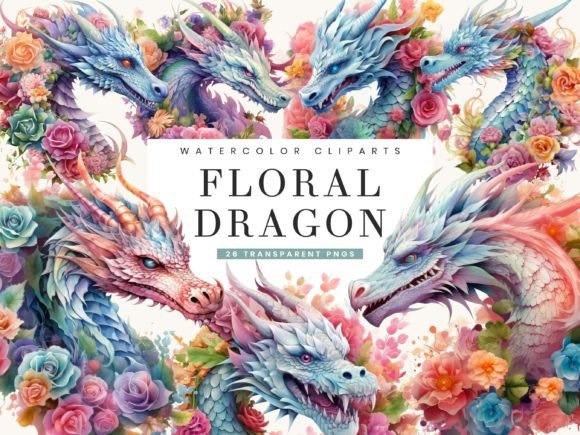
Mastering the Watercolor Floral Dragon Clipart Bundle for Professional Designs
Integrating fantasy elements into commercial or personal design projects requires a delicate balance between whimsy and professionalism. The Watercolor Floral Dragon Clipart Bundle offers a unique solution by merging mythical creatures with soft, organic botanical elements. This combination appeals to a wide demographic, from wedding invitation designers to creators of children’s educational materials. However, possessing high-quality assets is only half the battle. Many creators stumble not because the art is lacking, but because they misunderstand how to leverage these specific digital tools effectively.
When you download a collection featuring 26 hand-painted illustrations, you are investing in versatility. Yet, without proper technical knowledge and strategic application, even the most beautiful dragon clipart can look amateurish. Understanding the nuances of resolution, transparency, and thematic consistency is essential for turning these files into polished, market-ready products.
The Resolution Trap: Why 300 DPI Matters More Than You Think
One of the most common mistakes beginners make is ignoring file specifications until it is too late. A frequent misconception is that an image looking sharp on a computer screen will automatically print well. This is rarely true. The Watercolor Floral Dragon Clipart Bundle provides files at 300 DPI (dots per inch), which is the industry standard for high-quality printing. If you resize these images incorrectly or use them in a project set to 72 DPI (standard for web only), the final output may appear pixelated or blurry.
The Impact: Using low-resolution settings for print-on-demand products like posters, mugs, or invitations results in a lackluster customer experience and potential refunds. It undermines the perceived value of your work.
The Better Approach: Always check your canvas settings before importing any clipart. Ensure your document is set to 300 DPI if there is any possibility of physical printing. When scaling the dragon illustrations, always scale down rather than up. Enlarging a raster image beyond its original dimensions degrades quality instantly. If you need a larger format, consider using vector tracing tools, though keeping the original watercolor texture intact is often preferable for this specific aesthetic.
Misunderstanding Transparent Backgrounds and Layering
The bundle includes PNG files with transparent backgrounds. This feature is critical for seamless integration, yet many users overlook the importance of proper layering. A common error is placing a light-colored floral dragon directly over a busy or dark background without adjustment. Because watercolor art often features soft edges and varying opacity, poor contrast can make the subject disappear or look muddy.
The Impact: Poor visibility reduces readability and aesthetic appeal. In marketing materials, if the focal point—the dragon—is lost, the message fails to communicate.
The Better Approach: Use blending modes in your design software. For example, setting a white-heavy watercolor element to "Multiply" can help it integrate naturally with textured paper backgrounds. Conversely, ensure there is sufficient negative space around the dragon to let the intricate floral details breathe. Test your designs on multiple background colors before finalizing. Remember, transparency does not mean invisibility; it means flexibility. Use that flexibility to create depth by layering smaller floral elements behind the dragon and larger ones in front.
Thematic Consistency and Overuse
With 26 unique designs, there is a temptation to use as many as possible in a single project. This is a significant stylistic error. The charm of the Watercolor Floral Dragon Clipart Bundle lies in its elegance and subtlety. Cluttering a wedding invitation or a book cover with every available dragon and flower dilutes the impact of each individual piece.
The Impact: Visual clutter overwhelms the viewer. It makes the design look chaotic rather than enchanting. It also suggests a lack of curatorial skill, which can deter potential clients or buyers who associate minimalism with luxury.
The Better Approach: Adopt a "less is more" philosophy. Choose one primary dragon illustration as the focal point and use two or three complementary floral elements to frame it. Maintain a consistent color palette throughout your project. If the dragons feature soft pastels, avoid introducing neon or harsh contrasting colors elsewhere in the design. Consistency builds brand recognition and professional polish.
Licensing and Commercial Use Misconceptions
Many creators assume that purchasing a clipart bundle grants unlimited rights to resell the raw files. This is a dangerous misunderstanding. Typically, licenses allow you to use the graphics in end products—such as printed invitations, digital planners, or apparel—but prohibit the redistribution of the original PNG files as standalone clipart.
The Impact: Violating license terms can lead to legal issues, account bans on platforms like Etsy or Amazon KDP, and damage to your professional reputation.
The Better Approach: Read the license agreement included with the Watercolor Floral Dragon Clipart Bundle carefully. If you plan to sell digital products, ensure you are creating a new, transformative design. For instance, incorporate the dragons into a larger scene, add text, or combine them with other elements so that the final product is distinct from the original asset. When in doubt, contact the creator for clarification. Protecting your business starts with respecting intellectual property.
Optimizing for Digital vs. Print Applications
While the bundle is versatile, optimizing for different mediums requires different strategies. A common oversight is using the same file export settings for both Instagram posts and printed flyers. Digital platforms compress images, which can alter the subtle gradients of watercolor art. Print processes, on the other hand, require precise color profiles.
The Impact: Colors may shift unexpectedly. What looks like a vibrant emerald green on screen might print as a dull olive if the color profile is not managed correctly. Similarly, excessive compression on social media can introduce artifacts around the soft edges of the watercolor strokes.
The Better Approach: For digital use, save your final designs as high-quality JPEGs or PNGs, but be mindful of file size limits for web uploads. For print, convert your document to CMYK color mode if your printer requires it, and always request a proof before running a large batch. Keep the original PSD or layered files so you can make adjustments easily. This foresight saves time and money in the long run.
Final Considerations Before You Create
Before diving into your next project with the Watercolor Floral Dragon Clipart Bundle, take a moment to audit your workflow. Are your software tools up to date? Do you have a clear vision for how the fantasy elements will serve your narrative? By avoiding these common pitfalls—resolution errors, poor layering, thematic clutter, licensing violations, and format mismatches—you ensure that your creative output remains high-quality and professional.
These illustrations are more than just decorative elements; they are tools for storytelling. Whether you are designing a birthday card for a child who loves myths or a sophisticated logo for a boutique brand, treating these assets with technical respect and artistic intention will yield the best results. Embrace the magic of the dragon and the delicacy of the florals, but anchor your creativity in solid design principles.